
GT Racing 2 on HDTV and Android Sixaxis Controller!
Gaming Nirvana! That is what you get when you hook up your Device to a 37 inch HD TV and connect it to the Android Sixaxis Controller App.
Galaxy S5 Apps & Mods for the Galaxy S4 - Over 22!
 Ok, So I had to do it. Over 22 Aps & Mods from the Galaxy S5 running on my Galaxy S4! Over 22 minuits of video also.
If you just want to look at a specific app or mod, visit my YouTube video and you will see a 'menu', you can just just to an app of interest. Anyway, here it is all 22 minutes of it:
Links and Video below the break...
How to Install Galaxy S5 Launcher on Galaxy S4
 Hello! I've been running the Galaxy S5 Launcher on my S4 for a few weeks now and I have to say its very nice. This is how to Install it for a review of the S5 Launcher Click Here.
Big Thanks to the Eteam & Arsaw for the great work!
Runs very smooth, since making this video there have been several updates on the XDA Thread here:
Tablet Gaming with Android Sixaxis Controller!
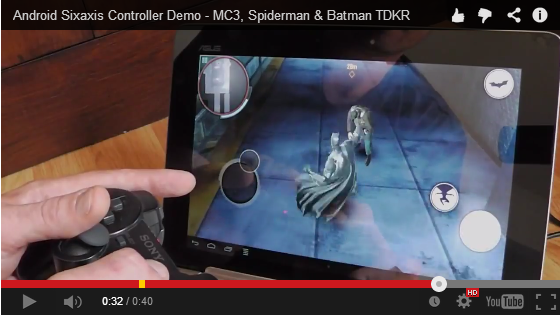
In this video you will see Modern Combat 4, Batman The Dark Knight Rises and The Amazing Spiderman. All of them map very well. and you rarely need to reach for the screen in any of the games.
Modern Combat 4 with my Playstation Controller & Homemade GameKlip!

I highly recommend mapping this game! Its smooth and it ROCKS!
Android Sixaxis Controller is on YouTube!
 Hey there Peoples!
Great News, I have just finished setting up the Android Sixaxis Controller YouTube Channel! I'll be posting videos of Game Demos, How to Guides and Other interesting Android Apps that I come across.
Head over and check out the latest videos, and remember to Like, Share and Subscribe to get all the latest updates. Click Here to visit the Android Sixaxis Controller App YouTube Channel.
Samsung Galaxy S4 Multi Window HIDDEN FEATURES, Floating Apps! Quad View!

I had to spread the word of this amazing Mod for Galaxy S4 Users! If you have a Galaxy S4 then head over to the XDA thread by Sorg and get Modding! (Original Credits for the find to xperiacle on XDA)
Sixaixis Controller App Gets Android 4.4 KitKat Update!
 Dancing Pixel Studios Have been hard at work again! Another update to bring compatibility for new or updated devices running Android 4.4 KitKat. So if your got a Nexus 5 or just upgraded your ROM to Android 4.4 remember to update the Sixaxis Controller App from the Play Store! What else is new? Read below the break...
GameKlip! The Perfect Companion for the Android Sixaxis Controller App!
 I Want a GameKlip for Christmas!The GameKlip attaches your Android phone to a DualShock3 controller, normally used for the PlayStation3. This allows you to use a real controller to play your games on your smartphone. It opens the Android platform up to more than just "casual" gaming with touch screen controls, and really gives you a full console experience at a fraction of the cost.
Another Huge Update for the Sixaxis Controller App!
 Well the Developer over at Dancing Pixel Studios has been a busy Man again brining some super sweet updates to this amazing app! So...
Yes, you guessed it! Support for the Playstation Move Controller! Amazing!
Read on for more updates>>>
What's New:
- New driver for devices with MTK chipsets.
- Support for x86 devices (i.e. Samsung Galaxy Tab 3 10.1).
- Support for PlayStation®Move Navigation Controller.
- Fixed device orientation issue on some firmware.
- Tweaked absolute analogue touch button to cause less jumping from centre. This especially improves smoothness of racing games with wheel control for steering.
- Added German & Italian translation (if you're interested in translating the app to other languages, please get in touch).
And please if you are interested in translating the app into other languages please contact the developer at dancingpixelstudios@gmail.com.
And if you own a Samsung Galaxy Tab 3 get gaming with the best Playstation Controller app on the Play Store!
Happy Gaming Gamers!
Sixaxis Controller Update - Fix for Android 4.3 Jelly Bean

If you're still experiencing touch emulation issues since upgrading to Android 4.3, please email your device and firmware details. It would also be useful if you could send output from the 'env' command run via a terminal app or using adb shell.
Email: dancingpixelstudios@gmail.com!
Sixaxis Controller Toggle Widget is Here!
 Another sweet update from Dancing Pixel Studios! So.....What's in version 0.6.3:
- Fix for some Samsung 4.2 firmware
- Added Toggle Widget
- Added new permission "android.permission.ACCESS_SUPERUSER" as required by SuperSU app (see http://su.chainfire.eu/#updates-permission for details) 0.6.4:
- Fixed Segmentation Fault affecting some devices
GO ON.... CLICK IT !!!!
Android 4.2 Update has arrived! And a few others.
Dancing Pixels has released another update for the Sixaxis Controller App!
- Complete rewrite of bluetooth drivers
- Added support for some fake gamepads (particularly Gasia)
- Vastly improved smoothness of analog sticks in touch profiles
- Improved smoothness of mouse pointer
- Fixed aesthetics of active touch profile chooser
- Improved reliability of starting and stopping driver
What's in this version: 0.6.0:
- Long awaited fix for Android 4.2- Complete rewrite of bluetooth drivers
- Added support for some fake gamepads (particularly Gasia)
- Vastly improved smoothness of analog sticks in touch profiles
- Improved smoothness of mouse pointer
- Fixed aesthetics of active touch profile chooser
- Improved reliability of starting and stopping driver
So get Sixaxis on your Nexus 7 now and start playing games the way your supposed to! If you have a non Sony game pad have another go, it may well be supported now.
HAPPY GAMING!
Android Sixaxis Gets Another Update!

What's new in this version:
- Added battery charge status.
- Added notification when a fake (and incompatible) controller is detected.
Sixaxis Update Solves "Can't bind pipe for device" Error!
.png)
Good News! For all the users that were getting an error "Can't bind pipe for device" on certain devices the developer has just released and update to both the 'Sixaxis Compatibility Checker' and the 'Sixaxis Controller App' to Version 0.5.6. that should resolve this issue.
So if you have had this issue head over to the Android Market download the Sixaxis Compatibility Checker and have another go!
Android Gaming at its best awaits you! :-) Oh yeah, leave a comment if this has resolved the issue for you.
Introduction to the Android Sixaxis Controller App!
So you thought gaming on your Android phone or tablet using a Sixaxis controller would be good? Well your wrong! Its not just good, its totally AWESOME!
This Blog will attempt to guide you through all the steps to get you playing. It seems like there is a lot to do but really once you get going you can be up and running in 20 minutes or less!
What you need:
This Blog will attempt to guide you through all the steps to get you playing. It seems like there is a lot to do but really once you get going you can be up and running in 20 minutes or less!
What you need:
- Rooted Android phone or tablet.
- Original Sony Sixaxis or Dualshock controller (Must be ORIGINAL SONY controller).
- Mini USB Cable (Normal Playstation controller charging cable).
- PC or Laptop if your device is running less than Android 3.1, or, does not have a USB port.
Quick Summary of Actions:
- Your device should be rooted.
- Download the 'Sixaxis Compatibility Checker' from the Android Market. Its free!
- Check that your device is compatible!
- Pair your controller with your device!
- Buy the 'Sixaxis Controller' App from the Android Market!
- Start creating or download touch profiles and get gaming!
- Hook up to your HDTV via HDMI and enjoy Android Gaming in big, beautiful HD Glory!
Happy Gaming!
STEP 1 - Your Device Must be Rooted!
OK, Lets get Started!
 In order for the Sixaxis Controller App to work your device must be 'Rooted'. I am not going to go into Rooting here as every device is different and there are plenty of resources out there to help you.
If you don't know what this means check out this article from Android Authority, 'Rooting for Dummies'
 I highly recommend searching the XDA Developers Forums for specific instructions on rooting your particular device.
 Feel free to leave a comment or post a question on our Forum if you are unsure about rooting your particular device, I, or other helpful members of this blog may be able to point you in the right direction! :-)
Happy Rooting!
Sixaxis Controller App Gets 'Jelly Bean' Update!

Great news for all Android Gamers running Jelly Bean. Dancing Pixel Studios has now updated the Sixaxis Controller App for Jelly Bean!
HAPPY GAMING JELLY BEANERs!
Subscribe to:
Posts
(
Atom
)